 OMNISDR
Your AI SDR for LinkedIn.
Find relevant prospects, qualify fit, reach out with context, keep conversations moving, and bring a person in when it matters.
- Research before outreach
- Optional connection notes
- A person can take over any thread
- Operated by EPROZ
- Setups reviewed before access
- No LinkedIn password in the setup form
- Human takeover on any thread
- Not affiliated with LinkedIn
What is OmniSDR?
OmniSDR is EPROZ’s AI SDR for LinkedIn, designed to help teams find relevant prospects, evaluate fit, conduct outreach and manage conversations in one workflow.
Prospecting eats the week.
OmniSDR looks for relevant people around your LinkedIn account, in the sources you choose to enable.
Generic messages are easy to ignore.
Each profile is researched and checked for fit first, so outreach starts from context rather than a template.
Replies go cold between other work.
OmniSDR keeps conversations moving from your playbook and brings you in when a person should answer.
Features
One SDR workflow, six connected parts.
Each part hands its work to the next, from the first profile OmniSDR finds to the moment you step into a conversation.
- Opportunity discovery
- Finding people worth contacting in the LinkedIn sources you enable: searches, profile views, post engagement and incoming requests.
- See how it works
- ICP qualification
- Checking a prospect’s public profile against your ideal customer profile before any outreach. People who do not fit can be skipped.
- See how it works
- Contextual outreach
- Outreach prepared from prospect context, your playbook and your target criteria, with an optional connection note.
- See how it works
- Knowledge-supported conversation
- Replies answered from your playbook, FAQs, knowledge sources and, where enabled, web research.
- See how it works
- Human handoff
- Bringing a person into a thread when it needs one. When you reply, OmniSDR stands down on that thread.
- See how it works
- Command Center
- One view of totals, history, the outreach funnel, active agents and the conversations that need you.
- See how it works
01Discovery
Find opportunities already around LinkedIn.
OmniSDR works from the LinkedIn account you connect: the people your searches surface, and the people already interacting with your profile and posts.
- People Search
- Content Search
- Profile Views
- Incoming Requests
- Post Engagement
Which sources run is part of your setup. No source promises a number of leads. Building separate prospect lists is OmniLead’s job.
OmniSDRLead sourcesProduct view
02Qualification
Research first. Outreach second.
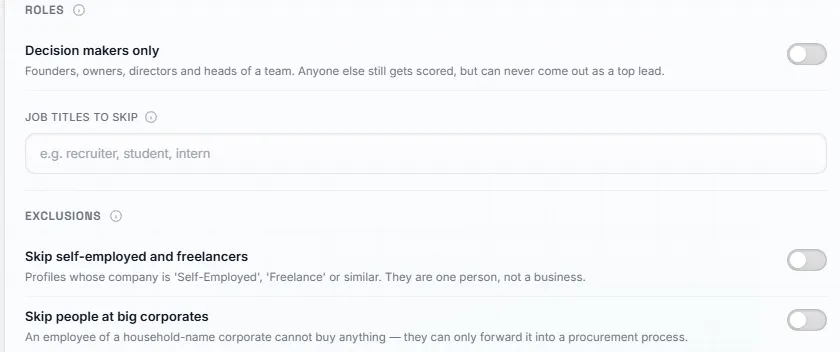
Before anyone receives a message, OmniSDR reads the public profile and compares it with the ideal customer profile you set up. People who do not fit can be skipped.
What your ICP can describe
Who
- Target roles
- Decision-maker criteria
- Languages
Where
- Industries
- Countries
- Company characteristics
Fit
- Fit signals
- Exclusions
Exact scoring is not published, and not every detail is visible on every profile.
OmniSDRIdeal customer profileProduct view
See OmniSDR in action
Three ways a lead can move.
Pick an example to follow one prospect from target to next step, including one who is skipped.
Illustrative examples. They are not customer conversations and do not predict results.
B2B software
Illustrative exampleA software team looking for sales leaders who already engage with the topic.
Target
Heads of Sales at B2B software companies, 51–200 people, DACH.
Signal
Commented on a post about outbound hiring.
Fit check
Fits the ICP.
- Decision maker
- Target industry
- Target region
Outreach
Opens with the post topic and the offer described in your playbook.
Reply
“Interesting. How does it decide who to contact?”
Next step
OmniSDR answers from your FAQs. A pricing question later goes to you.
Agency
Illustrative exampleAn agency reaching marketing leads who recently looked at the founder’s profile.
Target
Marketing directors at e-commerce brands in the United Kingdom.
Signal
Viewed your profile this week.
Fit check
Fits the ICP.
- Target role
- Target industry
- Company size in range
Outreach
Mentions their category and a relevant service from your knowledge sources.
Reply
“We are tied up until spring, but keep me posted.”
Next step
Follow-up timing comes from your playbook. You can step in at any point.
Recruiting
Illustrative exampleA recruiter whose ICP excludes one-person companies. This prospect is skipped.
Target
Engineering managers at fintech scale-ups in the Netherlands.
Signal
Sent you a connection request.
Fit check
Does not fit the ICP.
- Target role
- Target industry
- Self-employed, excluded
Result
Skipped. No outreach is sent, and the request stays with you.
How it works
Five steps from target to conversation.
Define your target
Describe the roles, industries, regions and fit signals you want, and the people to leave out.
Find relevant opportunities
OmniSDR looks at the sources you enable around your LinkedIn account.
Qualify before outreach
Each profile is checked against your ICP. People who do not fit can be skipped.
Start and continue conversations
Outreach goes out inside your active hours, and replies are answered from your playbook.
Step in when it matters
Conversations that need a person come to you. Reply and OmniSDR stands down on that thread.
Qualification pipeline
Every lead follows the same path.
This illustrates the workflow, not a guaranteed outcome. Many prospects stop at a fit check.
- Lead foundFrom a source you enabled
- Quick ICPA first check on the headline
- Full ICPThe profile against your ICP
- OutreachOnly when the fit is right
- ConnectedThe invitation is accepted
- ConversationReplies from your playbook
- Goal hitThe goal in your playbook
OmniSDRAI agentsProduct view
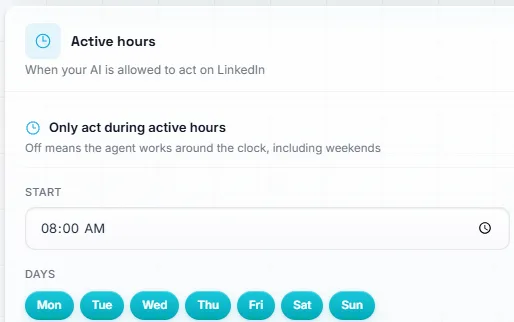
Active hours
The days and times you allow OmniSDR to act. Outside them, it waits.
03Contextual outreach
Outreach built around fit, context and timing.
When a prospect fits, OmniSDR prepares outreach from your target criteria, your playbook and what it learned about the person, then works at a measured pace inside the hours you choose.
- Personalized from prospect context and your playbook
- An optional connection note, where appropriate
- Paced activity inside your active hours
- Follow-up when a conversation goes quiet
Acceptance, replies, meetings and account safety are not guaranteed.
04AI conversations
Give your SDR the context to hold a useful conversation.
When someone replies, OmniSDR answers from what you give it and works toward the goal in your playbook.
- PlaybookYour offer, rules and conversation goal
- FAQsAnswers to the questions you hear often
- Knowledge sourcesLinked websites and files
- Additional contextAnything else the agent should know
- Web researchLive lookups, where enabled
A booking link in your playbook can be shared when the playbook says so. OmniSDR does not connect its own calendar.
OmniSDRKnowledge baseProduct view
05Human handoff
AI when it helps. You when it matters.
OmniSDR keeps routine replies moving and brings you in when a conversation needs a person. Reply from the OmniSDR inbox or from LinkedIn, and OmniSDR stands down on that thread.
ProspectThis looks relevant. How would it work for a team of four?
OmniSDRHappy to explain. It researches each profile first and only reaches out where the fit is right.
ProspectMakes sense. What would it cost for us?
Pricing question · handed to you
YouGood question. Let’s go through it together. Does Thursday work?
OmniSDR stood down on this thread
OmniSDRNeeds attentionProduct view
- Every thread in one inbox
- Questions outside the playbook come to you
- Take over any conversation at any time
06Command Center
See your LinkedIn outbound in one place.
The Command Center shows totals, recent history, the outreach funnel, active agents and the conversations waiting for you.
- Leads captured
- Qualified
- Connections sent
- Accepted
- Replies
OmniSDRCommand CenterProduct view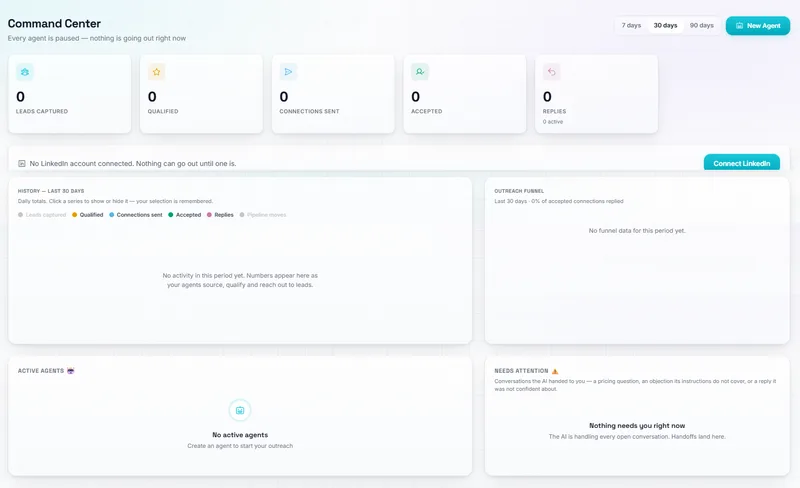
A real OmniSDR view from an account with nothing connected yet. Every value is zero. These are not customer results.
What OmniSDR handles
The repetitive outbound work.
- Discovers opportunities in the sources you enable
- Evaluates fit against your ICP
- Prepares personalized outreach
- Works inside your configured activity hours
- Monitors replies
- Continues appropriate conversations
- Surfaces conversations that need a person
You stay in control
You decide what it works from.
- Target audience
- ICP
- Business context
- Playbook
- Knowledge
- Activity hours
- Human takeover
Reply yourself on any thread and OmniSDR stands down. EPROZ reviews every setup before access is approved.
Also in the workspace
More around your LinkedIn motion.
Supporting tools next to the SDR work. Availability depends on your setup.
- My Posts
- Your own LinkedIn posts and how people respond.
- Engagement
- People who react to or comment on your recent posts can be picked up for research.
- Content Studio
- Prepare, schedule and publish your posts, where supported.
- Profile Optimizer
- Analyze or improve the LinkedIn profile for the audience you want to reach.
Outreach setup
Configure your OmniSDR
Tell us who you want to reach and how you want your LinkedIn outreach to work.
We’ll use your answers to understand the most relevant OmniSDR setup for your workflow.
Not sure what setup fits? Ask Alex before you answer.
No public price list yet. OmniSDR is reviewed around your outbound workflow. There is no checkout on this site, and access is not approved automatically.
FAQ
Questions about OmniSDR
Short answers about how OmniSDR works, what it asks for, and what it does not promise.
Ready to configure your OmniSDR?
Tell us how you want your LinkedIn outreach to work and we’ll use your answers to understand the most relevant setup.
Replies, meetings and account outcomes are not guaranteed.